

- Open BullX in Telegram and send command /start.
After clicking Login, BullX will automatically open their trading website for you.
.avif?alt=media&token=1fa002ba-5bce-488c-88a8-02996332604f)
- Click the icon in the upper right corner -> Wallet Manager.
.png?alt=media&token=577a55d9-2c3c-4353-ac05-d32061290afe) | .png?alt=media&token=ae6ce5b3-53e8-4273-bbf8-b057e031a820) |
- Click on Wallets -> Select Solana Network -> 2 Private Keys.
.png?alt=media&token=6229dd41-229d-4651-88cc-d5dc1b2c4166)
- Click on Download Private Key. You will download a file containing your wallet address and private key. Copy the private key part.
.png?alt=media&token=f71eef03-f217-43d5-b192-1d43f1983425)
- Open your phantom wallet on your phone and click the icon in the upper left corner.
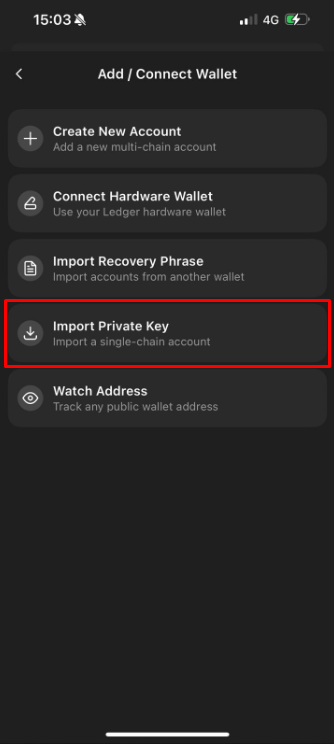
- Click on Add/Connect Wallet -> Import Private Key, and paste the private key you copied on the BullX.
 |  |
- Congratulations, you can now use this wallet to open soltap.io to claim free sol. If you need further guidance, you can check out our tutorial video about phantom wallet.